
01 /
Know your plants.
Give every plant a place of its own, with photos, care notes and the details you want to remember.
 FoliiA little care. A little growth.
Your everyday, a little greener
A home for your plants, your care rituals, and the small things worth noticing. Grow at your own pace with Folii.
Plant journal / Care plans / Everyday inspiration

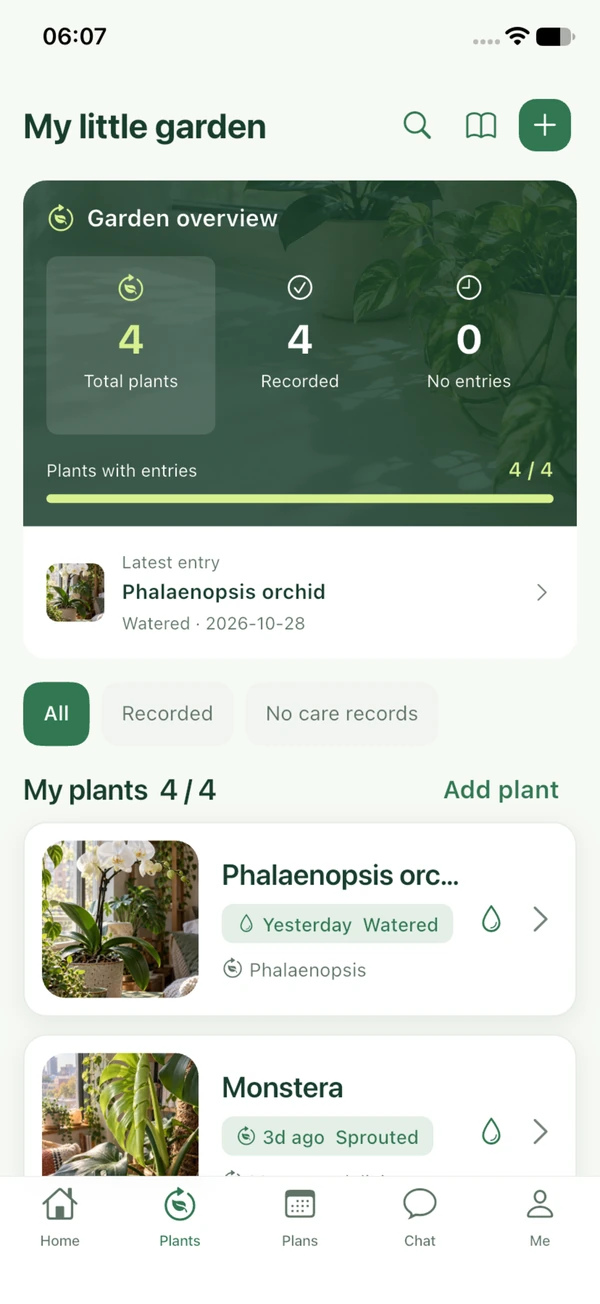
Growing, one day at a time
The first leaf. A new root. A routine that finally feels right. Folii helps you keep the moments that make growing feel good.
Give every plant a place of its own, with photos, care notes and the details you want to remember.

Make a care plan that fits your days. Keep track of watering, feeding and the other small acts that help things grow.

Collect the changes you might otherwise miss. A photo today becomes a lovely reminder of how far you have come.
There is no one way to grow
From a single cutting to a balcony full of green, every growing story belongs. Browse plant stories, save what inspires you, and make room for your own.
Make yourself at home
Find answers about accounts, photos, purchases and privacy.
Meet your everyday growing companion
A plant-care journal, a gentle daily rhythm, and a place to discover something new. Folii brings the small parts of growing together.
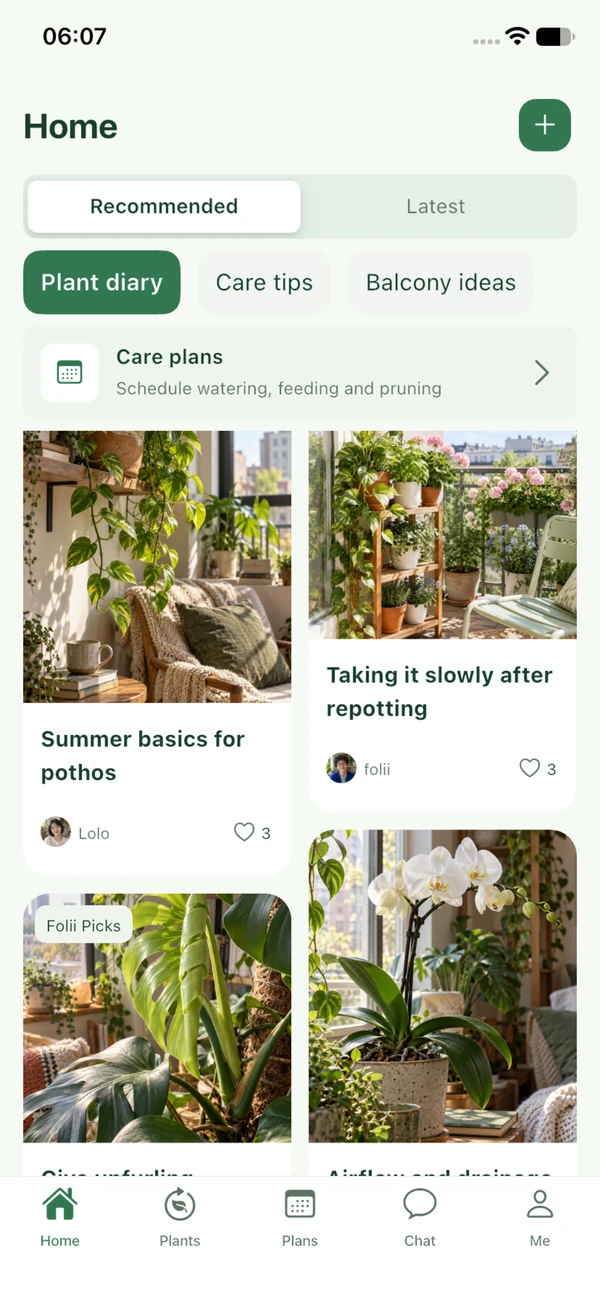
Plant stories, care ideas and the moments worth noticing.
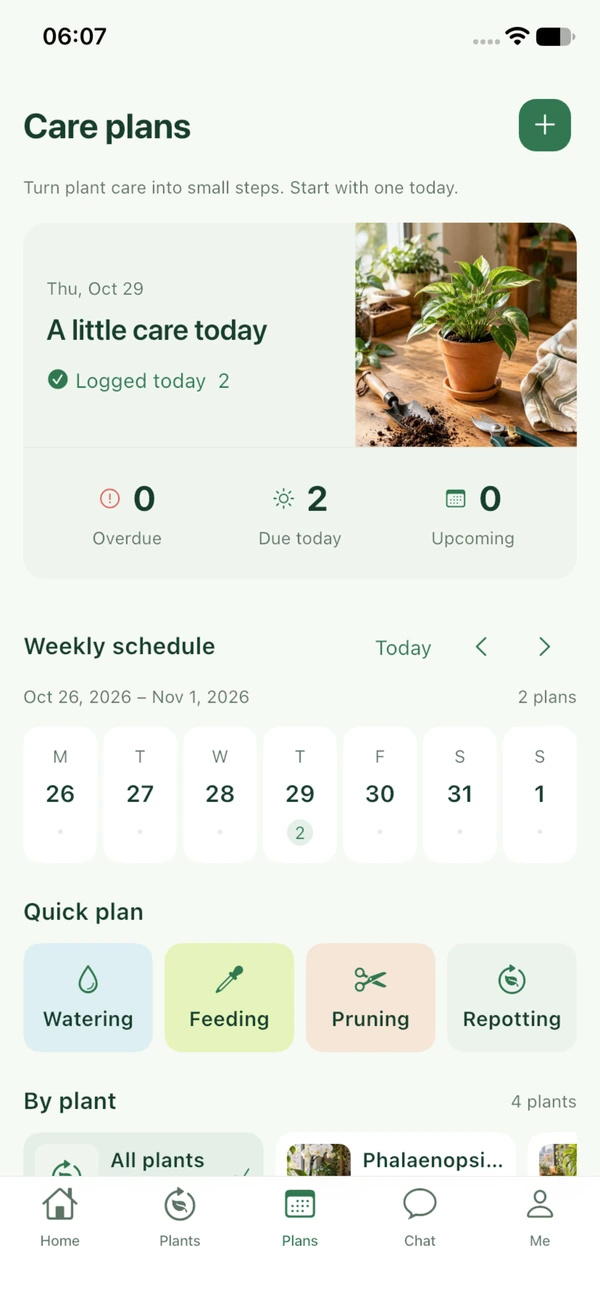
See what is due and make room for a growing routine.
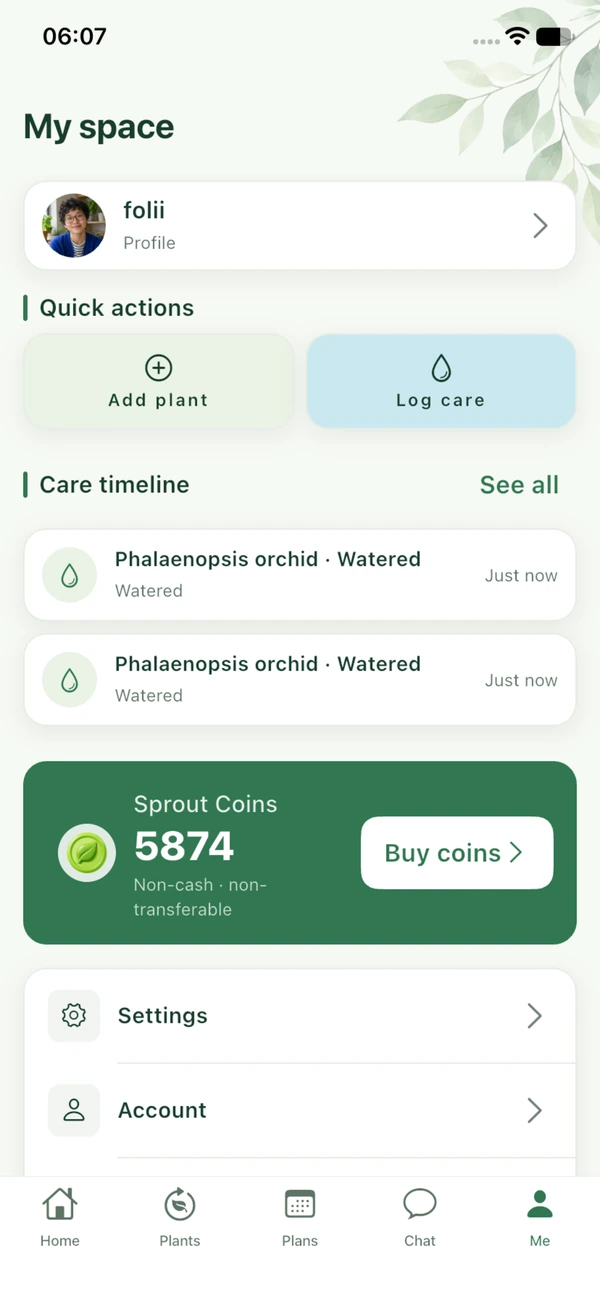
Revisit your care entries and manage your everyday essentials.
01 / Your plants
Keep a personal space for each plant, from its name and photo to the spot it loves. Add the changes you notice and look back at the care you have given.
02 / Your care
Bring watering, feeding, pruning and more into a routine that works for you. Plan a one-time task or a repeating rhythm, then keep a record when it is done.
03 / Your inspiration
Explore plant stories and care experiences. Save ideas you would like to try and choose the notes you want to add to your own collection.
Manage your plant profiles, care plans and growing journal, and choose the photos and notes you want to add. For information about your personal information and rights, read the Privacy Policy.
Folii support
Find answers, understand your choices, or tell us what needs a hand. Let’s make your Folii experience feel good again.
9 answers
In the app, go to Me → Settings → Account → Delete account. Read the notice, select the acknowledgment and confirm again.
Deletion permanently removes the account’s profile, plants, care records, posts, interactions, messages, attachments and unused Sprout Coins. Save anything important and review your balance first. If you cannot finish the process, email kuzucan1@proton.me. Do not send your password.
Use the edit option on your profile to update your nickname, avatar and bio. Save your changes when you are ready.
Review your details before saving and include only information you are comfortable sharing. Keep passwords and payment details out of your profile.
Open Care Plans to create a one-time or recurring task for a plant. When you complete a due task, Folii adds that care entry to the plant’s private timeline. Recurring plans advance to the next date.
You can also save a care entry directly from your plant. Check the plant, task and date before saving, and edit your records when you need to.
Folii requests permission when you choose a feature that needs it, such as taking a photo or video, selecting media or starting a recording.
You can decline, limit photo access or change permissions in iPhone Settings. Features that do not need that permission continue to work. See the Privacy Policy for details.
Check the Apple App Store order status and confirm which Folii account was active when you purchased. Pending, canceled and failed purchases do not add coins.
If Apple shows a successful purchase and the balance is still missing, email kuzucan1@proton.me with the product, purchase time and necessary order reference. Do not send your Apple Account password or card information.
Request an Apple refund through your purchase history or reportaproblem.apple.com. Apple decides under its rules and applicable law. Deleting your Folii account does not request a refund.
Sprout Coins are consumable items. Restore purchases applies to eligible purchases and cannot recover coins already spent or removed with a deleted account.
Use the actions on a post, comment, message or profile to report content. For help with a content concern, email kuzucan1@proton.me with the report reference, relevant content and a clear explanation.
For a copyright concern, include enough information to identify the material and explain your rights. Only share information needed for the request. Read the Community Guidelines for the rules.
Blocking hides the relevant profile and interactions in your Folii experience. Unblocking makes retained follows, messages and history visible again.
Blocking does not delete or refund earlier purchases or gift debits. You can review and manage blocked profiles from the app settings.
Email kuzucan1@proton.me with your question or request. Depending on applicable law, you may have rights to access, correction, deletion, restriction or withdrawal of consent.
We may ask for information needed to verify the request. Do not include passwords, device passcodes or full payment details. The Privacy Policy explains your choices.
No answers found. Try another word or topic, or email Folii for help.
Send your question, Folii version and any relevant details. Leave out sensitive information.
The essentials / Your agreement
A clear starting point for using Folii: your account, your content and the choices you make along the way. Please read these terms with our Privacy Policy and Community Guidelines.
These terms are between you and the Folii service provider and apply to the Folii iOS app and its plant records, care plans, content browsing, interactions and virtual items. Read these terms, the Privacy Policy and Community Guidelines before use. Confirming agreement when registering or signing in constitutes acceptance of the applicable terms. If you disagree, do not use the relevant services. Folii welcomes plant lovers worldwide. Applicable local consumer rights remain unaffected.
Follow applicable law and these terms when using the service. Use an email address you are entitled to use and provide lawful and accurate registration information. Keep your password secure and take responsibility for actions through your account. Do not impersonate others, rent or sell accounts, bypass permission restrictions, or use an account for unlawful activity. If you notice unauthorized use, update the relevant information and contact us promptly.
Folii provides plant profiles, care plans and entries, plant-themed posts, saved items and interactions. We grant you a limited, non-exclusive and non-transferable license for personal, non-commercial use in accordance with Apple’s applicable usage rules. Except as permitted by law, do not copy, resell, reverse engineer or interfere with the app.
You retain the rights you lawfully hold in original content and must obtain the rights, permissions and consents needed to submit text, images, audio and video. You allow Folii to save, organize and display that content as necessary for the features you choose; this permission does not transfer copyright. The Folii name, interface, assets and others’ content are protected by applicable law and may not be used for other purposes without permission.
Illegal content, pornography, violent threats, hate, fraud, harassment, infringement, privacy violations and content that harms others are prohibited. Do not disrupt the app, abuse reports or use virtual gifts to solicit transactions or promise returns. You can manage content through reports, blocking and deletion. For assistance or a rights complaint, send the relevant content, explanation and necessary evidence to kuzucan1@proton.me.
Sprout Coins are consumable digital items for virtual gifts in the app. They are not currency, investments or payment instruments, have no cash value, and cannot be withdrawn, resold or exchanged for physical goods. Virtual gifts do not generate income for recipients. Check the gift, recipient and coin cost before confirming. Confirmed sends deduct coins and create a record; completed gifts cannot be recalled, without limiting your statutory rights.
All in-app purchases are made through the Apple App Store. Products, prices, currencies and availability are confirmed on Apple’s purchase sheet. Successful purchases credit the corresponding coins once per order; canceled, failed or pending transactions do not. Check your current Folii account and coin pack before buying. Your Apple Account and Folii account are separate.
Sprout Coins are consumable items. Restore purchases applies to eligible purchases and does not restore coins already spent or removed with a deleted account. Check the product and coin amount before confirming a purchase.
Request a refund through your Apple purchase history or reportaproblem.apple.com. Apple handles requests under its rules and applicable law. Deleting an account or record does not request a refund. If coins are missing after a successful purchase, check the Apple order status, then contact kuzucan1@proton.me with the product, purchase time and necessary order reference. Do not send your Apple Account password or card information.
Personal information handling is explained in the Privacy Policy. You choose whether to grant Camera, Photos or microphone permissions and can change them in iPhone Settings. Keep your account secure and review the account deletion notice before confirming deletion.
You can stop using the app or start deletion at Me > Settings > Account > Delete account. After confirmation, deletion permanently removes the account’s profile, content, messages, attachments and unused Sprout Coins and cannot be undone. Deletion is not a refund request and does not affect purchase records retained by Apple under its policies or law. Registering again does not restore deleted content.
Plant content shares general experience and is not a substitute for professional advice concerning particular plants, treatments or safety issues. Follow product instructions and applicable rules when using fertilizers, pesticides or tools, or handling toxic plants. Folii is responsible for the app and its support. Apple is not the service provider under these terms and has no obligation to provide app maintenance or support. Applicable Apple usage rules also apply. These terms do not restrict consumer rights or responsibilities that cannot lawfully be excluded.
Updates to these terms will state their effective date. Material changes will be communicated appropriately, with consent requested where legally required. For questions about use, content rights or purchases, contact kuzucan1@proton.me with the issue and necessary records. You may first seek a resolution by contacting us. Your statutory rights to complain, appeal or seek relief from a competent authority are unaffected.
Use Folii with kindness, honesty and respect for others’ rights to support a positive plant-content and interaction experience.
Care journals, growth changes, repotting, pruning, propagation and plant photography are welcome. Where possible, describe the plant, conditions, timing and method, and distinguish personal experience from assumptions. Titles, images and text should agree. Do not exaggerate results or promise returns or suitability for every plant.
Respect others when discussing different views and address ideas without personal attacks. Abuse, discrimination, hate, sexual harassment, violent threats, persistent unwanted contact and coordinated attacks are prohibited. Respect another person’s choice not to reply, stop interacting or block you. Do not use other accounts or methods to continue unwanted contact.
Submit only content you created or have sufficient permission to use. Naming a source does not grant a license. Do not use others’ work, likenesses or private conversations without consent. Rights holders can send the content, evidence of rights and valid contact details to kuzucan1@proton.me. We will address the request according to the circumstances and applicable law.
Do not disclose identity documents, home addresses, live whereabouts, passwords, payment details or private information without consent. Check images for identifying information before adding them. For threats to personal safety, seek help promptly from appropriate emergency services or authorities.
Illegal content, pornography, graphic violence, encouragement of self-harm, scams, malicious links, unlawful trade and requests for payment credentials are prohibited. Do not use plant discussions to promote fake goods or high-risk investments. Do not promise cash back, income or investment returns from Sprout Coins or virtual gifts, or use gifts to pressure others.
Care advice should explain its applicable conditions and does not replace professional judgment for a specific situation. Follow product labels and applicable rules when using pesticides, fertilizers or tools, or handling toxic plants, and consider pets and the environment. Dangerous mixtures, unlawful collecting, protected-species trading and environmentally harmful content are prohibited.
Do not flood discussions, repeatedly post irrelevant material, impersonate others or create misleading information. Gifts express appreciation for content or interactions and do not represent investments, compensation or a promise of services. Check the recipient and coin cost before sending. Purchase issues are governed by the Apple App Store purchase and refund provisions in the Terms of Service.
You can report inappropriate content from the actions on a post, comment, message or profile. Provide an accurate reason and explanation. Do not fabricate evidence or submit repeated reports maliciously. You can delete your own content and manage interactions you do not wish to see.
You can view and add details to report records in the app. For assistance, send the reference, relevant content and necessary explanation to kuzucan1@proton.me, without unrelated personal information.
Blocking hides the relevant profile and interactions. Unblocking makes retained follows, messages and history visible again. Blocking does not delete or refund earlier purchase or gift debits.
Contact kuzucan1@proton.me about content, report records or these guidelines, with accurate and necessary information. Folii handles requests according to the circumstances and applicable law. Good-faith complaints do not limit your statutory rights. Changes to these guidelines will state their effective date, and material changes will be communicated appropriately.
For details about personal information, read the Privacy Policy.